Video review: [Add video here]
Conversion rate: 163.49 points = $1.00
Referral link: https://www.mypoints.com/?rb=Wvu3QNeJ2peoYeJ6&rp=1
MyPoints has been around for over a decade and was one of the original three titans of GPT (get-paid-to) beermoney platforms, alongside Swagbucks and InboxDollars. However, it has generally lagged behind the other two.
Back in the day, MyPoints was one of the first platforms I remember copying features from other successful beermoney sites, particularly Swagbucks. The two platforms look and function similarly, and they’re now both owned by Prodege.
I took several years away from MyPoints because I felt it was going downhill. I barely thought about the platform until a couple of months ago, when I decided to give it another try and see whether it had improved enough to compete with other beermoney apps today.
Despite always feeling a little behind Swagbucks and InboxDollars, I used to find MyPoints worth keeping around for a few specific reasons. I’ll cover those throughout this review.
How to Earn Money with MyPoints
Daily Goal
MyPoints has two daily goals that reset at 7 AM UTC. Completing them earns you points, and as you continue hitting your goals, they can increase for the following day. If you miss your goals, they can decrease.
You can also earn a bonus by maintaining a daily goal streak.
(Image: Daily goal and streak bonus)
Since MyPoints removed many of its video-earning opportunities, hitting the daily goals has become much more difficult. Unless you have access to True[x], you’ll likely need to rely on surveys, games, or other offers to reach them.
Daily Poll
The Daily Poll is located under the To Do List. It’s a simple multiple-choice question that gives you a guaranteed reward for participating.
It’s one of the easiest ways to earn a few points without much effort.
To Do List
The To Do List offers up to 10 points per day:
- 5 points for completing five tasks.
- An additional 5 points for completing all nine tasks.
Personally, I usually skip this because MyPoints has removed many of the easier earning methods that used to count toward the list.
You’ll receive nine daily tasks, which are generally the same from day to day, with one or two changing. Some involve surveys, receipts, or earning through the Discover section. I find the list much harder to complete than it used to be.
If you still want to squeeze as much as possible out of MyPoints, here’s a breakdown of the tasks and how to complete them.
MyPoints To Do List Guide
1. Vote in the Daily Poll
Answer the daily multiple-choice question. It’s quick and easy, and you can earn points for participating.
2. Deal of the Day
Clicking this task takes you to the Deal of the Day page. Visiting the page should count toward completing the task.
3. Add a Magic Receipts Deal
Open the Magic Receipts catalog and add any qualifying deal. If you don’t intend to purchase it, you can remove it afterward.
4. Log into the MyPoints App
If you have the mobile app installed, open it and let it load. This should complete the task.
5. Activate Score!
This task is associated with the MyPoints browser extension. I no longer have the extension installed, so I’ll update this section if I can confirm the current requirements. If the task has been replaced, the replacement may be different.
6. Earn Points from Discover
Clicking this task takes you to the Deals page. One of the easiest options, when available, is under Explore Web Content and Earn.
Look for the 2-point offers that ask you to click through certain links. These offers are limited, though, and you won’t necessarily find one available every day.
The next best option is True[x], if you’re one of the people who has access to it.
7. Attempt a Survey
As the name suggests, attempt a survey. This should count whether you qualify, get disqualified, or finish the survey.
8. Complete a Survey
This task requires you to successfully complete a survey.
9. Meet Your Daily Goal
This can be one of the more difficult tasks to complete. Unless you have access to True[x], you may need to spend time on surveys, games, or other offers to reach your goal.
Overall, I don’t think the To Do List is worth going out of your way to complete unless you’re already doing the activities it requires.
Shopping
MyPoints supports cashback at a large selection of retailers. You can visit a store through MyPoints and earn a certain number of points for every dollar you spend.
As long as your purchase tracks correctly and meets the retailer’s terms, this can be a nice way to earn a little back on purchases you were already planning to make.
I can’t say whether MyPoints consistently offers the highest cashback rates. Eventually, I’d like to put together a tier list comparing cashback rates across different beermoney platforms, especially if the differences turn out to be significant.
Deals
The Deals section is where you’ll find many of MyPoints’ other earning opportunities, including:
- Service sign-ups.
- Bank and financial offers.
- Microtasks.
- Offerwalls.
- Other promotional offers.
You can click on an offer to see its requirements and potential reward.
The section I want to highlight is Offers from Our Trusted Partners, located at the bottom of the page. This is where you’ll find my favorite reason for continuing to use MyPoints.
This is only available on the browser, not the app for True[x].
True[x] — The Main Reason I Still Use MyPoints
True[x] is the biggest reason I continue using MyPoints.
It plays a roughly 30-second advertisement in a separate window. You need to interact with the ad once by clicking on it, and after it finishes, you’ll receive the reward.
You’ll know you’ve done it correctly when the top of the video looks like the picture below.

You may have multiple ads available throughout the day, although availability varies.
There are two major downsides.
First, True[x] isn’t available to everyone. Its availability seems to depend heavily on location, so many users won’t have access to it.
Second, the timing can be inconsistent. I’ve found it most reliably around 7 AM UTC (Reset time), although sometimes ads become available at other times of the day.
When the ad finishes, make sure the window displays Return to Content. That’s the indication I look for before moving on to the next ad. You can then click True[x] again to check for another opportunity; you don’t need to close the window each time.
If you have access to True[x], I recommend checking Swagbucks and InboxDollars as well. Since all three platforms are owned by Prodege, there’s a good chance you’ll find True[x] available on the other two if it’s available on MyPoints.
It’s also much easier to manage this on a desktop or laptop.
For me, True[x] makes MyPoints worthwhile because it gives me another relatively low-effort earning method that I can stack alongside the same offer on other platforms. Without it, MyPoints becomes much harder to recommend.
Surveys
MyPoints usually gives me a decent number of surveys to choose from each day. Unfortunately, I rarely find them worth completing compared with surveys on other better beermoney apps.
The pay is often mediocre, and I feel like I get disqualified more frequently here than on some competing platforms.
My recommendation: If your main goal is earning money from surveys, I’d prioritize other apps or websites that offer better pay or a better overall experience.
Disqualification bonus: 3 points.
Survey Profile
The Survey Profile section is located alongside the surveys. It lets you answer basic demographic questions, usually a multiple-choice format.
You’ll earn 5 points for every 10 questions answered. These are guaranteed points for completing the questions, so you don’t have to worry about disqualifications.
The questions periodically refresh, giving you more opportunities to earn points.
This is a nice little bonus because the questions are generally quick and easy, although it isn’t a major source of earnings.
Magic Receipts
Magic Receipts lets you earn points by purchasing qualifying products from participating stores and submitting your receipt.
MyPoints regularly features promotions for specific items. Depending on the offer, you can earn a certain number of points for purchasing a qualifying product.
One thing to watch out for is that the reward isn’t always as straightforward as it looks. Some offers pay different amounts depending on how many items you buy or the weight of the product.
Once you submit a receipt containing a qualifying purchase, the system scans it and awards the applicable points. You’ll still get 2pts for submitting a receipt whether you have qualifying items or not.
Important: MyPoints, Swagbucks, and InboxDollars share this receipt system. If you submit a receipt through MyPoints, you won’t be able to submit that same receipt again through Swagbucks or InboxDollars.
Games
MyPoints offers the typical multi-level reward games found on many GPT platforms. Each game has its own task list, and you’ll earn points for completing each of the listed milestones.
The good news is that some MyPoints game offers are competitive with some of the highest-paying offers available on the market. Other offers pay less, but overall, I’d consider MyPoints a solid place to look for game offers.
The main downside is the smaller selection. You might find a good offer here, but you may not have as many games to choose from as you would on competing platforms.
Important: Most game offers require you to be a new user. If you’ve previously downloaded or played a game on your device, the offer may not track correctly.
Before starting an offer, compare its payout and requirements with other platforms. Since many offers require a new installation, starting a game in one place can prevent you from earning from the same offer elsewhere.
Travel
MyPoints also has travel cashback offers through various travel websites and booking portals.
If you’re planning a trip, you may be able to earn points by booking through one of MyPoints’ links. Make sure you start from the MyPoints website or use the browser extension as required so your purchase has a chance to track correctly.
This can be a nice way to get something back from a trip you were already planning.
However, I’d recommend comparing the rates with other cashback sites before booking. In my experience, MyPoints isn’t necessarily the best option for maximizing travel cashback.
As always, don’t spend extra money just to earn points.
Bingo
You can find Bingo under the More tab. It features a 5-by-5 bingo board, with each square requiring you to complete a specific task.
The board typically runs monthly or every other month. Rewards are displayed alongside the board, showing what you can earn for completing a row or clearing the entire board.
Tasks can include surveys, purchases, receipt submissions, games, and other offers.
Personally, I usually skip Bingo because some of the easier earning methods that used to appear on the board have been removed. Completing it can require more effort or spending than I consider worthwhile.
I’d only recommend pursuing the tasks that already fit into your usual earning routine or aren’t too out of the way.
Search to Earn
Search to Earn is located under the More tab. It lets you earn points by searching through the MyPoints search bar.
Each qualifying search earns 6 points. I usually collect points from three searches per day, although I can’t remember whether the daily limit is three or four.
It’s a fairly low-effort way to earn a few extra points, so I still use it regularly.
My Search Strategy
Although MyPoints pays less per search than Swagbucks, I usually do both because I can sometimes earn from the same number of searches on each platform.
If you use Swagbucks too, I recommend completing both sets of searches during the same session. Keep in mind that Swagbucks has requirements you must meet before its search rewards become available.
I prefer doing this on a computer, although you can use mobile browser tabs as well.
My usual routine is to:
- Open the Search to Earn page.
- Perform a search and wait around 20–30 seconds before the next one.
- Change the letters in my search terms between days rather than repeating the exact same searches indefinitely.
For example, I might use aaa, then aab, then aac. On another day, I might switch to baa, bab, and bac.
I’ve used a variation of this approach for years without being flagged, but I can’t guarantee that any particular search pattern will avoid account reviews. Make sure your searches comply with the platform’s current terms.
I also use different browsers when completing searches on multiple platforms. Swagbucks has become stricter about its search requirements, so check its current rules rather than assuming the same routine will work everywhere.
The main reason I double up is that I can sometimes earn search rewards on both platforms during the same session. The number of qualifying searches may occasionally differ.
MyPoints Browser Extension (Score!)
MyPoints has a browser extension called Score! I don’t keep it installed permanently, but you may be able to earn a one-time bonus of 100 points for installing it, depending on the current promotion.
The extension can make it easier to activate cashback, check available surveys, and enter promotional codes.
However, I personally find cashback tracking somewhat finicky when using the extension. I’ve had a better experience simply clicking through to a retailer from the MyPoints website.
If you only want the installation bonus, check the current terms before installing and removing the extension.
Point Perks
MyPoints occasionally releases promotional codes through its social media accounts. These usually offer around 3–4 points.
Personally, I tend to skip these because the codes don’t seem to appear as consistently as Swagbucks’ codes. Reddit is often the most reliable place I’ve found to see people sharing them.
If you’re already browsing those communities, it’s worth checking for new codes. I wouldn’t spend much time hunting them down, though, given the small rewards. Especially compared to Swagbucks codes that are sent out near daily.
MyPoints Cashout Options
Cashout time: Usually 1–3 days.
Minimum cashout: Generally $5 for most options, although some gift cards have higher minimums.
Available options include:
- PayPal.
- Amazon gift cards.
- Visa gift cards.
- Walmart gift cards.
- Google Play gift cards.
- More than 127 additional redemption options.
The exact options and minimums can vary, especially for gift cards.
One thing I find strange is that Prodege owns both MyPoints and Swagbucks, yet MyPoints doesn’t offer the same instant-cashout experience that some users may be familiar with on other platforms. I don’t know why the redemption systems differ.
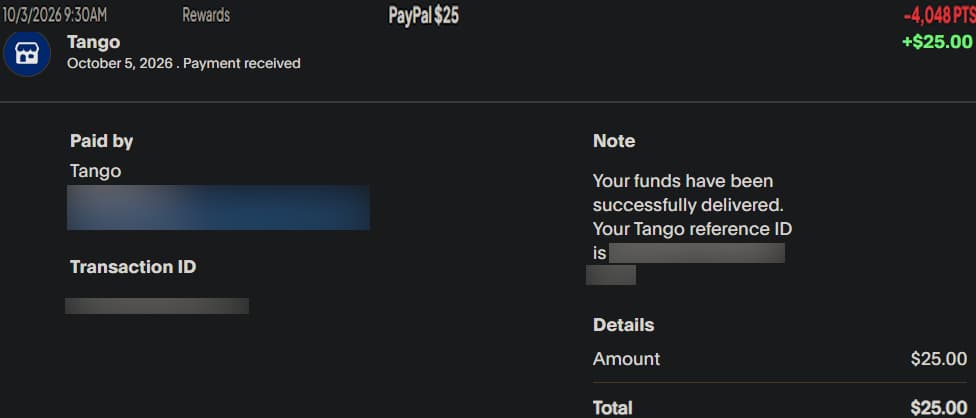
📷 Payment Proof
MyPoints Availability
- Platforms: Desktop, Android, and iOS.
- Countries: United States and Canada.
MyPoints Pros and Cons
Pros
- PayPal cashouts.
- Many gift card and redemption options.
- Multiple ways to earn points.
- Some competitive, high-paying game offers.
- True[x) are an easy additional earning method if available.
- Search rewards offer a little extra income for minimal effort.
- Receipt submissions can earn a small reward even without qualifying purchases.
Cons
- No instant cashouts.
- Lower effective earnings than Swagbucks in many areas.
- Survey pay and selection are mediocre compared with better alternatives.
- Some offers pay less than competing platforms.
- The To Do List has become harder to complete since easier earning methods were removed.
- The platform feels somewhat behind the times.
- True[x] isn’t available to everyone.
- The selection of games is more limited than on some competing apps.
Final Thoughts: Is MyPoints Worth Using in 2026?
Would I recommend MyPoints?
If you’re not already using Swagbucks, MyPoints may be worth checking out. However, if you already use Swagbucks and especially if you don’t have access to True[x], it’s difficult for me to recommend MyPoints.
MyPoints is essentially a similar platform to Swagbucks, but I generally find its overall earning potential less appealing. Its surveys are often mediocre, and many other offers can be found on newer beermoney apps that pay better.
In my experience, MyPoints’ strongest features are its game offers, True[x], and daily search rewards. Some game offers can compete with the best available elsewhere, and the search rewards are easy enough to collect alongside Swagbucks.
I also tend to give beermoney platforms extra weight when they offer multiple earning methods, particularly low-effort options. Unfortunately, MyPoints’ removal of many video and other easy earning opportunities has made it harder to earn consistently without completing surveys, playing games, or pursuing other offers.
The biggest exception is True[x]. If you have access to it, MyPoints becomes more appealing because you can potentially stack the same earning method across MyPoints, Swagbucks, and InboxDollars.
Overall, I’d consider MyPoints a decent GPT site, but not one I’d prioritize for most people. If you already use Swagbucks, I don’t see much reason to add MyPoints unless you’re interested in its particular game offers, want the additional search rewards, or can take advantage of True[x].
For me, True[x] is what keeps MyPoints in my rotation. Without it, I’d rather spend my time on a better beermoney platform with better overall earning opportunities.