You’ll usually get two sets of daily challenges along with Treasure Quests. Daily challenges require 8, treasure Quests sometimes require 5–8 challenges.
Make sure to complete all the challenges before the next set comes in, any uncompleted challenges are replaced.
🎉 From time to time, a special event runs where Daily Challenges and Treasure Quests refresh every hour (or every few hours). The carousel should follow this pattern as well, if not an hour later. Because the refresh window is shorter, each reset includes fewer games and lower completion requirements, making the challenges easier to finish within the limited time.
This setup is generally more favorable for Daily Challenges, and in some cases Treasure Quests, depending on how many keys are required to unlock the treasure chest for a cash reward.
Additionally, JustPlay occasionally runs giveaway raffles. These typically require completing a set number of Daily Challenge cycles (usually 7). This does not refer to individual games within a Daily Challenge, but rather the number of full Daily Challenge sets you complete.
The Carousel
The Carousel is one of the newest features JustPlay has added. It works similarly to the Daily Challenges and Treasure Quests. There’s no visible timer showing when the game list resets, but it seems to reset when the others do, sometimes an hour later.
Usually, you’ll get a list of five games to play, each with a set challenge, sometimes you get fewer games (not fully sure why yet). For every game you complete there’ll be an hour cooldown before you can do the challenge again. You earn a special coin currency that can be used to spin the Carousel for various prizes. Possible rewards include:
- JustPlay coins (around 200–1500)
- Real cash ($0.01–$0.10)
- Diamonds (If you collect 5 diamonds, you can win a cash prize)
The Diamond jackpot seems to double the previous jackpot amount each time you hit it (not sure if there’s a cap yet). - A cash prize (They’ve been adding higher cash prizes over time, I won’t be updating the amount.)
- Lightning bolt (not sure what this does, I haven’t hit it even with 500+ spins).
As expected, the better the reward, the lower the odds of getting it. Personally, I mostly end up with JustPlay coins, which is why I don’t go out of my way to do some of the challenges, especially the more time consuming ones. The challenge requirements are usually the highest requirements they’ll give for each game.
I’ve noticed that sometimes you’re given fewer games, though I’m not entirely sure why yet. My guess is that it depends on how many challenges you’ve completed before the reset, for example, when I finish 3 out of 5 challenges, I usually only get 2 new ones next time. I’ll test this more and update my thoughts later.
🧠 Unlike Daily Challenges or Treasure Quests, the Carousel can sometimes include challenges for the same games as those offers, though the required levels or points might differ. It’s worth checking the Carousel first to see if any overlap, so you can complete both at once.
⚠️ Occasionally, the Carousel might not reward you with JustPlay coins after completing a challenge.
Overall, I’m not too into the Carousel. I get that the odds for the better prizes have to be low, but personally, I just don’t feel like grinding that hard just to earn spins for mostly small rewards. It also tends to have the more annoying challenges to complete.
🧠 I’ll throw a list of challenges I tend to avoid for the carousel below the game guides.
👉 Note: This guide is based on my experience. If something works differently for you, please share in the comments to help others.
Important Notes
⚠️ Uninstall/Reinstall Trick
Some games save your progress, which makes challenges harder since you can’t replay early levels. Restarting from Level 1 is much faster and easier (and you’ll often memorize the solutions).
- Uninstall after finishing each challenge.
- Reinstall before starting again, when you get the challenge again.
- This doesn’t guarantee progress reset, but it lowers the chance.
⚠️ Caution
I’ve had a few apps where progress was saved and I can’t reset to Level 1. I tried:
- Clearing app data
- Installing under a different Google account
- Using an app that uninstalls and wipes files
Unfortunately nothing worked.
👉 Don’t try removing JustPlay itself. Since there’s no account login and face verification prevents making new ones, you risk losing your access.
📌 About Level Answers
I won’t list picture answers for certain apps because the progress saved and I can’t restart from Level 1. If that happens to you, you can usually find them with a quick Google search:[App Name] + all answers
🧠 Justplay adds new games and different challenges from time to time, so I’ll do my best to update this page when I can, as well as updates to the current guide if I find better ways to do things.
Game Guides
I’ll be listing the maximum amount of levels, sometimes the carousel has way less levels required, than the rest, or Justplay will occasionally raise/lower the amount of level or points required for these challenges.
⚠️ Although the Carousel shares games with Daily Challenge and Treasure Quest and progress on those games is tracked across all three, there is a key difference. For Carousel challenges, you must click “Earn Token” for the game to track and completion to register. This step is not required for Daily Challenge or Treasure Quest; those challenges typically track progress even if you launch the game directly without clicking through from their screens.
Additionally, the Carousel may occasionally feature the same game more than once. Even if the game and challenge requirements are the same, each challenge must be completed separately. You must click “Earn Token” for each Carousel entry; otherwise, the challenge will not count, even if you meet the requirements.
💰 Treasure Master
Requirement: Reach Level 15
- Straightforward: shoot darts without hitting other darts.
- Best strategy is spamming darts quickly (don’t go too fast), going slow makes the last darts harder.
Sometimes the rotation of the monster is slower so you might shoot your dart into the previous dart, causing you to lose. - ⚠️ On Level 10 or 15, sometimes you’ll face a weird-rotation boss. If that happens: fail → restart (don’t continue). You’ll usually get the easier boss when you reach level 10 again.
You do have 2 revives (requires ad watch each) every run if you want to try and continue. - Recent update added an instant kill dart, as the name implies it’ll instantly kill the monster or boss. Dart still works even if you hit your own dart or darts already on the monster or boss.
You can get this dart by hitting the greyed out circle with a dart and “+” sign on the bottom right, which will have you watch an ad for one dart.
You’ll also be prompted to use a dart if you use up both your revives or hit the give up after failing a stage.
When this function came out you could get an infinite amount of darts if you kept watching ads, but they nerfed it and you can only get one dart every hour. Doesn’t seem like you can stack these, so don’t worry about trying to farm and stockpile them. - Challenge completes when you beat level 15.
🃏 Solitaire Verse
Requirement: Win 1–5 games
- Unfortunately, the Ace exploit has been patched, which previously allowed a free win by placing an Ace without playing a full game.
- Now that you have to play the game normally, this has become one of the most time-consuming challenges. Solitaire, to my knowledge, is not 100% winnable, so even solid runs can fail due to unfavorable RNG. You may need to start new hands when you get stuck.
- I’ll be adding tips to help increase your chances of winning. These won’t guarantee success, but they can reduce the number of winnable setups that still end in losses. I’m not especially strong at Solitaire and previously relied on the exploit to avoid playing full games. Since that option is gone, this is currently the most time-intensive game challenge you’ll encounter.
- (Tips coming soon.)
⚠️ Tracking for this game can be unreliable at times. It’s also the only game I recommend launching directly from the challenge screen (Daily Challenges or Treasure Quests). While this isn’t strictly required for tracking, unlike with Carousel games, it helps avoid confusion, since there is another solitaire game that looks nearly identical.
🕷️ Spider Solitaire
Requirement: win 2 games
This is by far the most time-consuming and effort-heavy challenge for me. That may be due to not having a solid strategy, but it’s definitely more difficult than regular Solitaire, at least in my experience.
When you first enter the game, select Game → Spiderette Deal. This mode is shorter since there are fewer sets to complete.
The gameplay is similar to Solitaire, but with a key difference: instead of building from Ace to King, you build in reverse order. Cards can only be cleared when you complete a full set, unlike regular Solitaire where cards are placed one at a time in ascending order. Once a full set is completed, it’s automatically moved to the completed pile.
I’m not particularly strong at Solitaire, and to my knowledge, most Solitaire variants aren’t 100% winnable, so you’ll sometimes need to restart hands if you get stuck.
There’s likely a legitimate strategy for this mode. When I find one, or at least some reliable tips, I’ll list them. For now, my approach is mostly heavy use of the undo button, which requires watching an ad each time, combined with memorizing card positions after each undo.
Fortunately this challenge doesn’t appear as often.
↩️ Ball Bounce
Requirement: Collect 12–15 coins
Method 1 (Fastest): (current recommended method)
- Pause (||) (top left) → reset until you get a coin in the first row.
- Shoot, collect coin, repeat from step above.
- Alternative is to reset until you get a coin, then shoot to hit the coin, and use undo button (bottom left, might need to wait for ad to be loaded to use), then repeat.
Method 2 (Setup Method):
⚠️ (with a recent update this method might not work anymore at the moment)
- Reset until a coin spawns in the first row (preferably with fewer blocks).
- Shoot once to clear blocks but avoid the coin. Undo → repeat until another coin spawns stacked above.
- Repeat until you’ve stacked 8-9 rows of coins.
- Then line up your shot straight under the coin column for easy vertical clears.
⚠️ Cautions:
- Don’t close the game immediately after your last undo, wait a few minutes, sometimes it won’t save properly.
- Be careful not to tap the screen by mistake; if you shoot without undoing, you’ll have to restart.
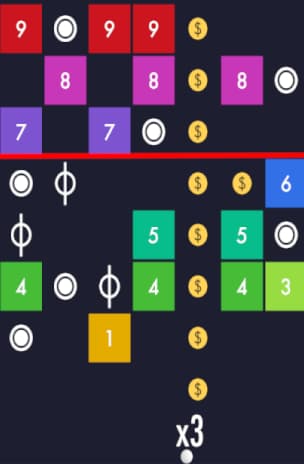
Coin stack example (not worth setting up at the moment due to recent update)
Try to start lining up the coin 3 blocks from the top should have 5-6 coins stacked, where the red line is.
↩️ Atlantis Bounce
Requirement: 15 coins
- Same as Ball Bounce, but simpler.
- Spam restart until coin spawns in first row → shoot to collect coin → restart → repeat.
You can do this right when the ball hits the coins and collects them, don’t need to wait for the ball to come back down. - Optional: after finishing each challenge, preload a coin at the end of the cycle for next time, just so you start with an easy coin every time you get this challenge.
📍 Pin Master
Requirement: 10 levels
✅ Uninstall to restart for every challenge
⚠️ Uninstall after finishing the challenge to avoid saved progress (not a guarantee)
- Simple puzzles. You can watch ads to remove screws or planks, some of the higher levels might force you to remove one screw.
- Restarting from Level 1 makes the challenge much faster.
- Make sure to hit continue on the final level you need to complete so it counts it.
- Recent update allows you to stack powerups if you need them, I’d recommend going for the blocks one, which will remove a whole block. prior to the update you needed 2 ads to remove a block, and you couldn’t stack stockpile the powerups.
- ⚠️ If progress saves, you’ll start at higher levels, which slows things down.
😔 I unfortunately got my progress saved.
💥 Bubble Pop – Wild Rescue
Requirement: 10 levels
✅ Repeat same 10 levels for every challenge
- Aim for the cluster with the tiger.
- Safer to clear bottom-up, but wall-bounces can save time.
- Sometimes speedrunning fails if RNG doesn’t give needed colors.
🔍 Word Seeker
Requirement: 12 levels
✅ Repeat same 12 levels for every challenge
- Uninstall doesn’t reset progress.
- Replay the first chapter’s 10 levels, then second chapter; levels 11 & 12.
- To restart: cog (top left) → three lines → level select, we do this because hitting next takes you to highest level you’re on.
- Always hit “Continue” before selecting manually, or it may not count.
- If you want to speed things up, hit the cog while you’re searching for the words.
Video Answers:
🌪️ Spiral Drop
Requirement: 10 levels
✅ Uninstall to restart for each challenge
⚠️ Uninstall after finishing the challenge to avoid saved progress (not a guarantee)
- Avoid red zones.
- Lightning bolts clear multiple floors, not a big deal if you miss them.
I’ve also triggered something that clears multiple floors every so often that isn’t a lightning bolt, but I’m not sure what it is yet, feel like it randomly happens. - Shields give retries, not worth watching ad to get more.
⚠️ If unlucky, progress may save and you’ll start higher than Level 1.
😔 I unfortunately got my progress saved.
🌠 Space Connect
Requirement: 12 levels
✅ Repeat same 12 levels for every challenge
- Always start at Beginner, Level 1.
- Hitting next will take you to the next level, instead of highest level you’re on.
- You can use hints, You get these in the main menu from the shop (bottom right), manual play is way faster than trying to farm enough hints for all 12 levels.
⬢ Hex Match
Requirement: 10 levels
✅ Uninstall to restart for each challenge
⚠️ Uninstall after finishing the challenge to avoid saved progress (not a guarantee)
- Google the answers – (hex match all answers)
- Use hints if you needed, if you want to figure it out yourself.
- If your progress saved like mine, hit the play button → Beginner → Your highest level.
Unfortunately repeating levels you’ve already done or has been saved won’t count for the challenge.
⚠️ If unlucky, progress may save and you’ll start higher than Level 1.
😔 I unfortunately got my progress saved.
🀄 Tile Match Pro
Requirement: 12 levels
✅ Repeat same 12 levels for every challenge
⚠️ If this isn’t your first time on this game avoid Level 4, it soft locks (forces power-up usage that you don’t have, nor does it give you a free one). Close and reopen game if you accidently went to level 4.
- Uninstall doesn’t reset progress.
- Hit “All Levels”
- Best method: play Levels 1–13, skip Level 4.
- After finishing a level → hit House → “All Levels” to select the next level manually (Triangle takes you to the highest level you’re on).
🧠 Personally I like to do levels 1-8 (skip 4), wait for payout, then levels 9-13. The reason I do this is because Tile Match Pro is one of the best and quickest for getting coins to hit your coin goal.
Only do this if you have the time to, better to just finish the challenge than optimize.
💧 Water Sorter
Requirement: 10 levels
✅ Repeat same 10 levels for every challenge
- Start from Easy, Level 1.
- Levels 1-10 are pretty easy and quick to do.
- Using level skip doesn’t count for challenge (cog on top right → “Skip level”).
🟦 Tangram Heaven
Requirement: 15 levels
✅ Repeat same 15 levels every challenge
- Start on Beginner, Level 1.
- Use hints (25 coins) if stuck.
- Levels repeat, so you’ll eventually memorize piece placement.
(I’ll update this for levels 11 and 12 soon)
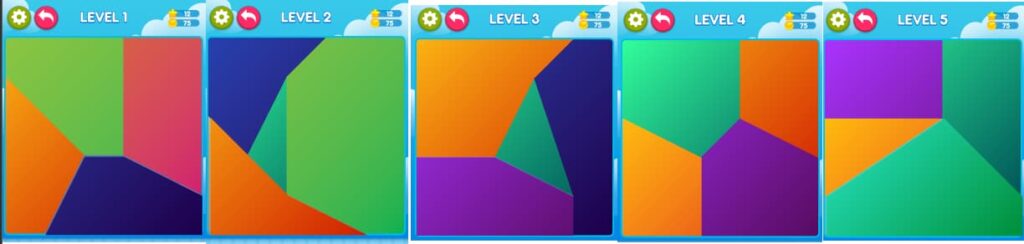
Screen shot answers lv. 1-5:
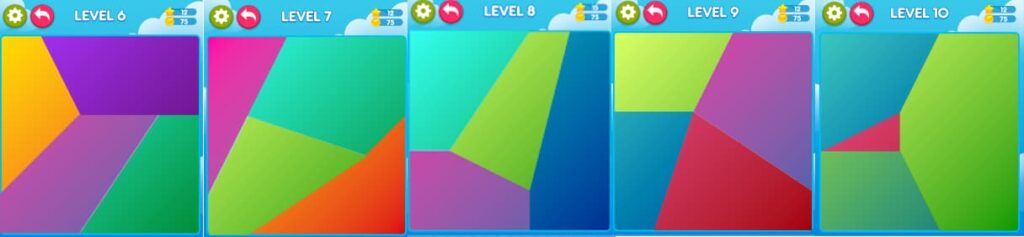
Screenshot answers lv. 5-10:
I’ll add 10-15 soon.
🕳️ Black Hole Clash
Requirement: 12 levels
✅ Uninstall to restart each challenge
⚠️ Uninstall after finishing the challenge to avoid saved progress (not a guarantee)
- Collect all white blocks/spheres, avoid colored ones.
- Sometimes fails to register correctly, bugs out if you collect colored pieces together with last white pieces and reviving. If you watch an ad to revive, there’s no more white pieces to collect.
- ⚠️ If progress saves, higher levels may place white shapes under colored ones.
😔 I unfortunately had my progress saved.
🟥 Puzzle Pop Blaster
Requirement: 10 levels
✅ Repeat same 10 levels for every challenge
- Focus on required amount of colored blocks for each level (top-right).
- Levels 1–3 auto-progress from hitting next level, after that you’ll need to manually select.
- Use hammers on Levels 5+ if needed (especially on beach balls), doesn’t work on the yellow tops in level 9.
- Recommendation: if you happen to have level 18 done, I’d recommend it over level 10, only saves you like 10-20 seconds if anything, so not a big deal.
🧠 A lot of levels are set up the same way for certain blocks, so you can kind of memorize those to get through levels quick and effortlessly, not the biggest deal, but it is a time saver for a lot of levels.
💣 Sugar Rush Adventure
Requirement: 10 levels
✅ Repeat same 10 levels for every challenge
- Start at Level 1; levels play in sequence (hitting next goes to next level instead of your highest level).
- Levels 6–8: gingerbread requires match of 3 of the same color to gingerbread.
- Use hammers (ads or coins) on tough levels (esp. 7–10), including on gingerbreads.
- If there’s no matches, make any match (even if its not 3 of the same color) to have it refresh the pieces to give you matches.
- ⚠️ Sometimes the board won’t reshuffle until you attempt a move.
📝 Word Kitchen
Requirement: 12-15 levels
✅ Repeat same 12-15 levels for every challenge
- Choose “Malicoco” → start Level 1.
- Answers:
- Lv. 1: the | he
- Lv. 2: an | ad | and
- Lv. 3: of | or | for
- Lv. 4: as | say
- Lv. 5: but | tub
- Lv. 6: of | go | fog
- Lv. 7: ow | low | owl
- Lv. 8: to | opt | pot | top
- Lv. 9: arm | ram | mar
- Lv. 10: as | ash | has
- Lv. 11: or | do | rod
- Lv. 12: at | pat | apt | tap
- Lv. 13 at | hat | tat | that
- Lv. 14 it | hi | wit | hit | with | whit
- Lv. 15 he | the | yet | hey | they
💥 Merge Blast
Requirement: 6,000–8,000 pts
- Goal: merge same-number blocks for higher numbers, you get points every block.
- Strategy: build to 6,000-8,000 pts, then pause. Closing the app usually saves progress (wait a couple mins to be safe).
- On repeat challenges: just make one more merge (might take 2-3 merges) → wait for completion notification → switch back to JustPlay. This one can be a bit slow to update.
- ⚠️ Eventually you’ll fail and run out of lives and need to restart from 0pts again.
🔨 Mad Smash
Requirement: 10 levels
✅ Uninstall to restart for each challenge
⚠️ Uninstall after finishing to avoid saved progress (not a guarantee)
- Avoid black segments, break downward.
- Fill combo bar for invincibility (like Mario star power).
- Levels are fixed, you can memorize patterns if you want to go faster, sometimes going faster in certain parts and sections are better than always to time the invincibility.
- 🧠 Recent update added a fire powerup option, which you can access from the shop, 1 ad watched = 1 Fire power up.
(you’ll need to wait a bit for ads to load before you get the free option for it)
If you’re lazy like me you can just watch ads to get enough and easily complete this challenge. - Fire powerup gives you full immunity, same as the combo bar one, it doesn’t seem like it has a time limit on how long it lasts.
To use the fire powerup, you’ll need to tap to play (be careful if you’re about to start with a black segment, it’ll still count as a loss, or a loss of a shield), the Powerup is on the bottom left.
😔 I unfortunately had my progress saved.
👨🍳 Bubble Chef
Requirement: 10 levels
✅ Uninstall to restart for each challenge
⚠️ Uninstall after finishing the challenge to avoid saved progress (not a guarantee)
- Easier than Bubble Pop, but requires clearing all bubbles or meat balls.
- Bounce shots are accurate, use walls if needed to get in the nooks and crannies.
- Levels are always the same layout.
- Best method: finish Levels 1-5 → wait for justplay coin update notification → uninstall. Then reinstall and repeat Levels 1–5.
🧩 Wooden Puzzle Bliss
Requirement: 2,000 pts
- First run: reach 2,000 pts. Use bombs if board clogs up.
- After setup: each challenge only needs 1 block placement (or row clear).
- Super fast completions after the first time.
- If stuck, use bomb powerup to clear a portion of the board
🟩 BlockBuster Arcade
Requirement: 2,000 pts
- Same setup as Wooden Puzzle Bliss.
- After setup: usually 1 block or row clear completes the challenge instantly.
- First run: reach 2,000 pts using bomb power-up if needed.
- If stuck, use bomb powerup to clear whole board.
🍜 Food Blast
Requirement: 10 levels
✅ Uninstall to restart for each challenge
⚠️ Uninstall after finishing the challenge to avoid saved progress (not a guarantee)
- Focus on goal blocks per level (top left).
- Collecting multiple blocks for power-ups speed things up.
- Best method: finish Levels 1-5 → confirm JustPlay coin update after level 5 → uninstall. Then repeat Levels 1–5.
🎱 Slide & roll
Requirement: 10 levels
✅ Repeat same 10 levels for every challenge
- Get ball from start to end by moving pieces around to create a route.
- Pretty quick to do all levels, each level is the exact same layout
Video answers:
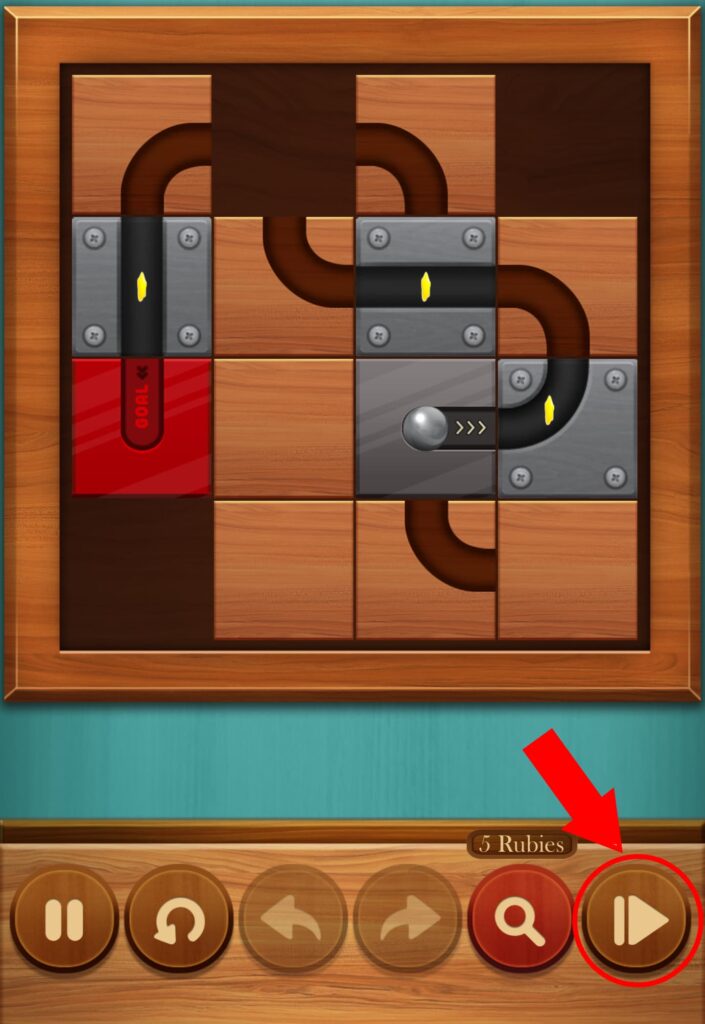
🧠 If you’ve completed the levels at least once, you can skip all levels up to your highest completed level to complete the challenge without having to play. The skip button on the bottom right (picture below).
Skip tech
🧩 Match3D: Carnival Crew
Requirement: 10 levels
✅ Uninstall to restart for each challenge
⚠️ Uninstall after finishing the challenge to avoid saved progress (not a guarantee)
- Match 2 of the same items, don’t need to drag, just tap each item.
- Focus on what items are required, if it’s too cluttered clear what you need to.
- First level won’t count, so you’ll be doing up to level 11.
- Don’t match too fast, it’s a little slow and will fling what you tap to match next back into the pile.
Unfortunately there’s not really any tips or ways to make this one go quicker, so you’ll just have to slog through it.
🛩️ Aero Escape
Requirement: 10 Stars
Pretty straightforward game, you mainly need to pay attention to two things: red and yellow circles with white triangles inside them. Both appear on the edges of your screen, so keep an eye out.
After getting one star, I usually hit the pause button (top right), then home button. It feels faster since it resets all the missiles, each time you get a star it’ll be a distance away anyways, even if you didn’t restart.
- Red circles indicate incoming missiles. These are tracking missiles that move faster than your plane and will follow you. When one gets close, do a quick loop (left or right) to dodge it and create distance. If two missiles are chasing you, you can make them collide to destroy both, that’s the only way to get rid of them.
- Yellow circles show the direction of coins. They can be a little hard to spot (at least for me), especially when they appear under the “Boost Coin” label (which is for JustPlay coins, not Aero Escape coins). Sometimes you’ll just need to fly around and wait for a coin to spawn.
- Blue circles show where shields are. I don’t go out of my way for these, but they do protect you for a short amount of time from missiles.
There’s also a Retry option that plays an ad. I usually just restart since it places the star away from you, even if you die next to the coin.
You need a total of 10 coins (not consecutively), so don’t worry about dying in between.
🏀 Slam Dunk
Requirement: 5-6 Levels Completed
Honestly, this one’s a bit annoying (probably just a skill issue on my end). It’s a super simple game, you just need to bounce a basketball into a hoop. There’s a yellow timer bar that slowly depletes a the top of the screen, showing how much time you have to make your next hoop. The faster you score, the more time gets added back to the bar for the next hoop.
Each level requires you to make a certain number of shots before you can move on. You’ll see the number of required hoops displayed at the top, just below the timer. Every tap makes the ball bounce a certain height, so you’ll want to experiment a bit to get the feel of the physics.
Luckily, you can retry as many times as you want, I don’t think there’s a limit, so it’s hard to actually fail. It’s more of a grind than a challenge, just a matter of keeping at it until you finish all 6 levels.
⚠️ If you don’t do the retry, it’ll make you restart from level 1 again, and you’ll have to work your way to beating level 6. The challenge requires you to beat level 6, not 6 levels total.
🧵 Threadform
Requirement: 10 levels Completed
This one is fairly quick if you know the answers. Just make sure the thread fully connects to each pin. If you move too fast, the game may not register the connection, even if the thread passes over the pin. I usually drag the thread slightly to the left or right of each pin to ensure it attaches before moving on to the next one.